
BoxTrapper requires all email senders not on your Whitelist to respond to verification emails. It protects you from spam.
If you want to get rid of unwanted emails, enable Boxtrapper either on all emails or just selected emails and configure it.
1. Log in to your cPanel Account,
2. In the Email section, click on BoxTrapper.

3. On the BoxTrapper's page, you see a list of your emails under the Account heading and the status of BoxTrapper under the Status heading. Choose Manage.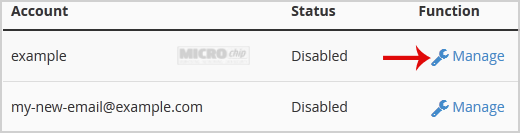
4. On the BoxTrapper's Manage page, if the status is Disabled, Choose Enable.
- Home
-
Store
- Browse All
- PROFESSIONAL HOSTING
- Linux VPS
- Windows VPS
- Cloud Storage
- S3 Object Storage
- Server Cloud Linux
- Server Cloud Windows
- Cloud Computer's
- GMail G Suite
- Office 365
- Skype
- Azure
- SharePoint
- OneDrive
- Visio Online
- Exchange Online
- Google ADS & Facebook ADS
- Rack System assistance
- Web System assistance
- SSL Certificates
- XOVI NOW
- VPN
- Register a New Domain
- Transfer Domains to Us
- Announcements
- Knowledgebase
- Network Status
- Contact Us
- Whois
-
More